Using Timer Controls
To understand the Timer control, create a new project
that displays the current time in a label control.
Add a timer control and a label control to the form.
The best way to place a timer control is to double
click the timer control icon in the toolbox. The following
figure shows a timer control and a label.
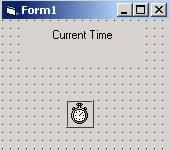
Set the following properties
| Control |
Property |
Value |
| Form |
Name |
frmTime |
| Form |
Caption |
Timer Demo |
| Label |
Name |
lblTime |
| Label |
Caption |
Current Time |
| Timer |
Name |
tmrClock |
| Timer |
Enabled |
True |
| Timer |
Interval |
1000 |
The source code needed for this example is stored
in the
"Source Code\Chapter14\Current Time" directory.
To open the project double click the "TimerDemo.vbp"
file.

Private Sub tmrClock_Timer()
lblTime.Caption = Time$
End Sub
 
The caption of the label control is updated once
a second. The Time$ function returns a string value
of the current time.
|


